Introduction:
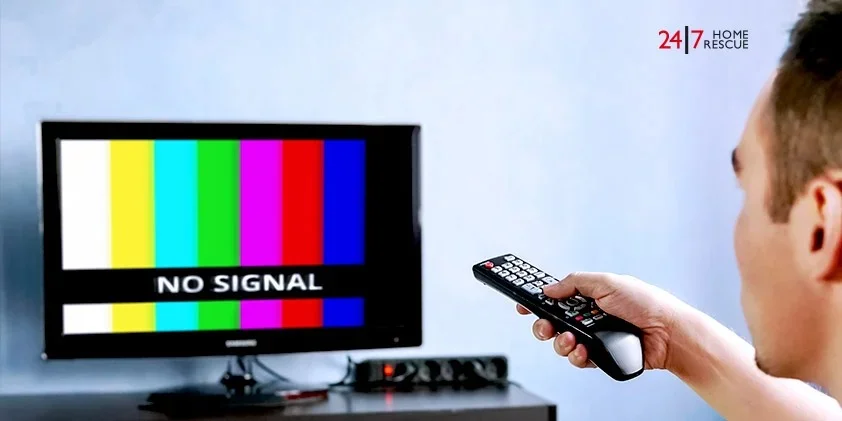
Has it ever happened to you that you turned on your TV and upon turning it on, you saw “No Signal” written on it and nothing else! This is a common and ordinary issue that millions of people face daily. But you have absolutely no need to worry. Today we will explain this thing in detail step by step, whether there is any signal, and how to fix it.
What is the meaning of “no signal”
When you turn on your TV and it shows you “no signal,” then it means that your TV is not receiving any picture or video from any device. I would say it in simpler words like this: it is like you are talking on some phone, but there is no sound—the connection is not being established.
The TV needs a source to function, such as:
- Cable box
- Dish antenna
- DVD player
- Gaming console
- Streaming device
- Laptop
- Computer
The reason for no signal on the TV is also when any of these devices is not properly connected to the TV.
Reasons for the “no Signal”

There can be many reasons for this problem; let’s look at the common problems.
1. Setting the wrong input score
Each TV has many input options, such as HDMI 1 HDMI2 AV etc. For example, if your cable box is plugged into HDMI 1, but the TV is set on HDMI2, the TV will display “no signal” as both devices are not in proximity.
It is as if your favorite program is playing on 101 FM, but you’re listening to it at 95 FM – which will not allow you to listen to your favorite program. This means that it is very important to have the right channel as input.
2. loose or unplugged cables
Sometimes the wires or cables are not connected properly or become a little loose. When the wire is not properly connected to the TV or device, there will be no signal, and the message “No Signal” will appear.
This problem can occur while cleaning the house, moving furniture or if someone accidentally touches the wire.
3. Damaged Cables
If your cable wire is very old or broken, or if there is some other fault in it, then sometimes the signals will not come through completely. Sometimes it also happens that the wire, which looks absolutely fine on the outside is actually damaged or damaged underneath.
4. The device is closed or not working.
If a device is closed or a technical problem, such as a cable box, dish receiver, or other equipment, it may not be able to send a signal to the TV. The device should work properly.
5. TV or Device Needs a Restart
Sometimes electronics experience minor technical issues that are fixed by restarting. This also happens with computers and phones.
6. Meteorological problems (for dish/satellite)
If you use a dish antenna, the signal may be weakened or completely blocked due to heavy rains, storms or heavy clouds. This is a temporary problem.
7. HDMI Handshake Issue
While it is a technical term, it is easy to understand. For example, when someone talks to another to connect a TV or device, it can also be called a handshake. Sometimes this process does not occur properly, and a sign is not received.
How to fix the “no Signal” problem?

Ab agr hum ya sari problems jan gy hain jin sy “No Signal” likha hua ata ha to ab us k solutions b jan laty hain or un ko step by step follow krty hain
Step 1: Check the correct input score
You have to look for your TV’s remote; there you will see an “Input Score” or TV/Video button, and you have to press it. After that, a list will open that will have all the input options. Then go to each option and open it.
If your setup box is associated with an HDMI cable, try HDMI 1 or HDMI 2 or HDMI 3. If it is a DVD player then try AV.
Step 2: Check all the cables
Go behind the TV and check if all the wires are properly installed. Press each wire slightly to check if it is tight or loose. Finally, check both the wires—one wire should be in the TV, and the other should be in the device. Check both properly.
If you feel that the wire is loose, then fix it properly or check it.
Step 3: Reconnect the cables
Sometimes removing the wire and reinserting it also solves the problem. Remove the wire slowly. If you cannot remove it forcefully, wait for 10 seconds and then reinsert it and check. Take special care not to damage the wire or connectors.
Step 4: Replace the damaged cable
If the wire is very old or worn out, start using a new one. HDMI cables don’t cost much and are easily serviced.
Step 5: Restart the tool
First of all, close whatever device you are using. Then turn off your TV. Stop for 30 seconds. Then connect and check the device. This process gives all electronics a new beginning.
Step 6: Try a separate HDMI port
If you have 3-4 HDMI ports on the TV, try to plug the cable into another port. Sometimes the problem occurs with a particular port.
Step 7: Check the device settings
Some devices have output settings. Go to the menu of your cable box or DVD player and check video output settings. Options such as “Auto,” “HDMI,” or “1080P” should be available.
Step 8: Check the problems related to electricity
Check whether the cable box or device is getting proper electricity. Are its lights burning? If not, check its power cable or turn it on.
Special tips for Desh Antenna

If you dish it out and there’s a “no signal”:
- Check the weather: In heavy rain or storms, the signal is temporarily lost.
- Check the direction of the dish: Sometimes, due to very strong winds or storms, the direction of the dish may change. You can call a good technician to fix the problem.
- Check for obstructions on the dish: If there is a tree in front of your dish, it may also be blocking the signal.
- Check LNB (Dish Head): The LNB (Librater) is a device located on the front of the dish and may be faulty. Only technicians can check it. Only the technician can check this.
Tips for Cable Connection
If you connect it with a cable:
- Trace the cable wire: Check to see if the wire is cut anywhere, or if you accidentally disconnected a new one.
- Check the splitter: If multiple TVs are connected to one cable, check the splitter (device that divides the wires).
- Call the cable operator: Sometimes, there may be a cable issue in the entire area, which only the cable operator can fix.
When to seek professional help?
If you’ve tried all the solutions but the problem still doesn’t get resolved, is it time to seek professional help?
- If there’s a technical fault with the TV itself
- If the ports are damaged
- If the dish needs realignment
- If the cable box or device needs repair
Professional technicians have a wide range of methods, proper tools, and experience to solve complex problems.
Prevention Tips: Avoid Future Problems
You can also follow some simple solutions so that the problem does not recur.
- Manage cables properly: Keep wires neat, bundled together, and protected.
- Regular cleaning: Clean the dust behind the TV. Dust can cause problems in the ports.
- Be careful when moving: When moving the TV or moving furniture, be careful of the cords.
- Use quality cables: Don’t use very cheap cables. Slightly better quality wire lasts longer.
- Use a surge protector: This device protects against voltage fluctuations.
Common Myths and Facts
Myth: “No signal” means the TV is broken. Fact: In most cases, this is a simple connection issue that can be easily fixed.
Myth: Signal will come only through wires. Fact: A good working wire of normal quality is sufficient. No need for expensive wires.
Myth: You have to call a technician every time. Fact: You can do basic testing yourself. Most problems are simple.
Conclusion:
If you are getting a “No Signal” message on your TV, there is no need to worry. This is a common problem, and you can fix it yourself in 5-10 minutes. First, check the input source for a good signal, then check the wiring, and then restart the device. These three steps cure 80-90% of cases.
Remember that technologies sometimes present minor problems, and this is normal. Be patient, test step by step. And most problems will be solved easily.
If the problem seems complicated or you’re not comfortable with wiring, there’s no harm in calling a specialist or technician. The best part is that you can see your favorite show instantly!
By understanding this article, you can solve these TV problems in your home yourself. And if a friend or family member faces this problem, you can now help them too!