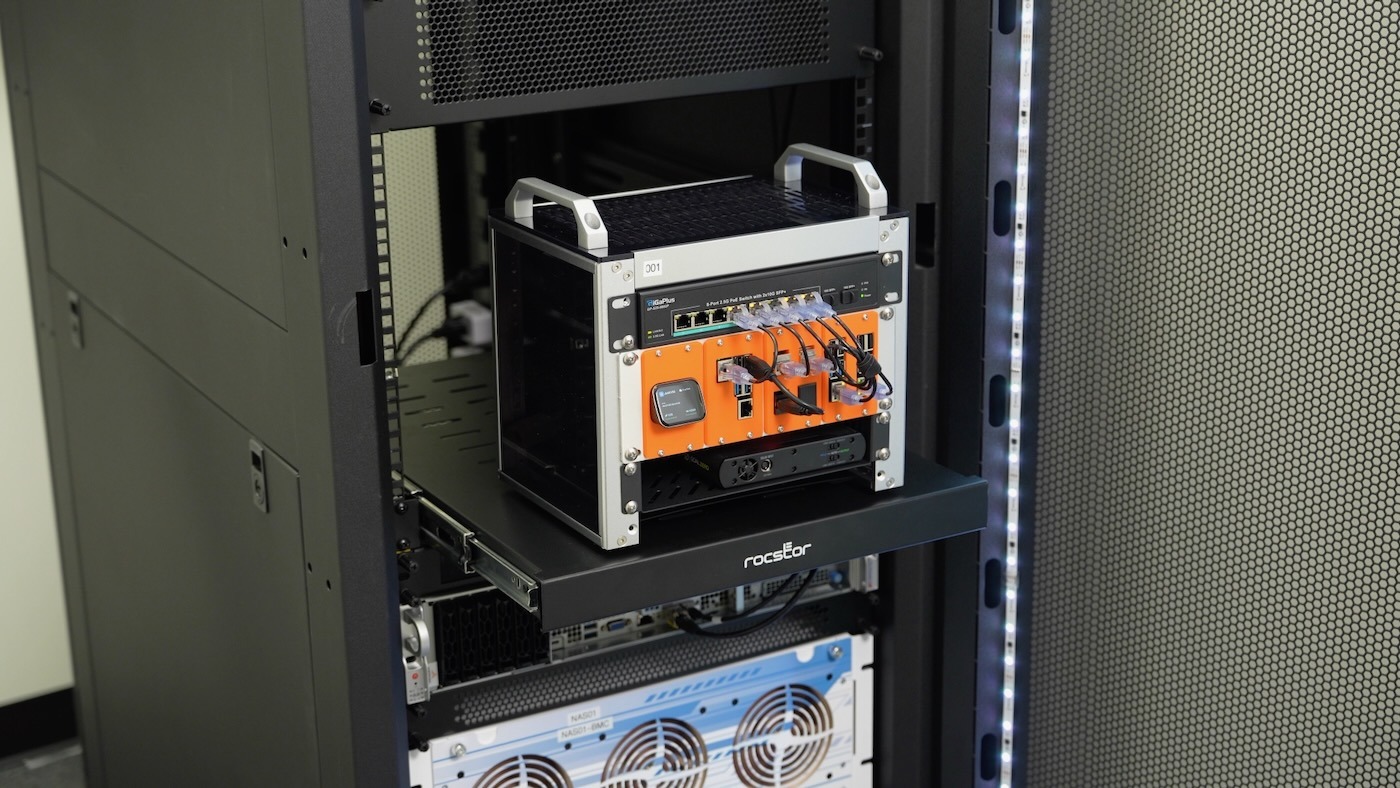
Building a reliable IT infrastructure starts with one crucial decision: choosing the right network rack cabinet. Whether you’re setting up a small business network or expanding a data center, the right cabinet can make the difference between a chaotic tangle of cables and a professional, organized system that runs smoothly for years.
Network administrators and IT professionals know that proper equipment housing isn’t just about aesthetics—it’s about performance, security, and maintaining uptime. A well-chosen network rack cabinet protects valuable equipment, improves airflow, and provides the foundation for scalable growth.
This comprehensive guide walks through everything needed to select, install, and maintain the perfect network rack solution for any environment.
What Is a Network Rack Cabinet
A network rack cabinet serves as the backbone of an organized IT infrastructure, providing a standardized mounting system for network equipment, servers, and related components. Unlike simple shelving or makeshift solutions, these specialized enclosures follow strict industry standards that ensure compatibility across different manufacturers and equipment types.
The cabinet functions as more than just storage—it’s an engineered system designed to optimize airflow, manage power distribution, and provide security for critical network components. Most IT equipment enclosures feature the standard 19-inch rack mounting system, which has become the universal standard for professional networking gear.
Modern data center cabinets integrate multiple functions into a single unit. They house network switches, routers, servers, patch panels, and power distribution units while maintaining proper ventilation and cable organization. This centralized approach simplifies maintenance, improves troubleshooting, and creates a professional appearance that reflects well on any organization.
The importance of proper equipment housing becomes clear when considering the alternative. Without a dedicated server room cabinet, equipment often ends up scattered across desks, stacked precariously, or mounted in improvised solutions that create fire hazards and make maintenance nearly impossible.
Types of Network Rack Cabinets
Open Frame Racks vs Enclosed Cabinets
The choice between open frame racks and fully enclosed cabinets depends heavily on the installation environment and security requirements. Open frame racks offer excellent accessibility and airflow, making them ideal for controlled environments where dust and unauthorized access aren’t concerns.
Open frame designs cost significantly less than enclosed alternatives and provide unrestricted access to equipment from all sides. This makes them popular in dedicated server rooms where environmental conditions are already controlled. The lightweight construction also simplifies installation in environments where floor loading is a concern.
Enclosed network server racks provide superior protection against dust, debris, and unauthorized access. The solid construction includes locking doors, removable side panels, and often integrated cooling systems. These features make enclosed cabinets essential for offices, retail environments, or anywhere the equipment needs protection from environmental factors.
Many enclosed models feature glass or perforated doors that allow visual monitoring of equipment status lights while maintaining security. The trade-off comes in higher costs and potentially restricted airflow that requires careful planning to avoid overheating issues.
Wall Mount vs Floor Standing Options
Wall-mount rack solutions excel in space-constrained environments where floor space is at a premium. These compact units typically accommodate 6U to 12U of equipment, making them perfect for small office networks, telecommunications closets, or retail point-of-sale systems.
The wall-mounted approach keeps equipment off the floor and away from potential water damage while freeing up valuable floor space for other uses. Installation requires proper wall anchoring to support the combined weight of the cabinet and equipment, but most modern wall mount systems include comprehensive mounting hardware.
Floor-standing rack enclosures handle larger equipment loads and provide room for future expansion. These units typically range from 24U to 48U in height, accommodating full-size servers, multiple network switches, and extensive cable management systems. The stable base design distributes weight evenly and often includes casters for repositioning when needed.
The choice between wall mount and floor standing often comes down to current needs versus future growth plans. Wall mount solutions work well for established networks with predictable equipment requirements, while floor-standing cabinets better serve growing organizations that anticipate regular equipment additions.
Standard 19-Inch Racks vs Other Configurations
The 19-inch rack standard dominates professional networking equipment, with virtually all enterprise-grade switches, routers, and servers designed for this mounting width. This standardization ensures compatibility across manufacturers and simplifies equipment selection for IT professionals.
Some specialized applications require different rack configurations. Telecommunications equipment sometimes uses 23-inch racks, while some industrial applications employ custom mounting systems. However, these alternatives represent niche markets, and most organizations benefit from sticking with the widely adopted 19-inch standard.
The 19-inch width measurement refers to the mounting face, with actual cabinet widths typically measuring around 24 inches to accommodate the mounting rails and cable management space. This standardization extends to mounting hole patterns, ensuring that equipment from different manufacturers can be mixed within the same cabinet.
Desktop and Portable Rack Solutions
Desktop rack units serve environments where traditional cabinets are impractical or unnecessary. These compact solutions accommodate 4U to 8U of equipment and often include integrated power strips and basic cable management features.
Portable racks address temporary installations, trade shows, or field service applications. These units typically feature wheeled bases, integrated handles, and ruggedized construction to survive transportation and outdoor use. The trade-off comes in limited capacity and higher per-unit costs compared to permanent installations.
Some portable solutions include integrated power conditioning, uninterruptible power supplies, and even network monitoring equipment. This makes them popular for emergency response teams, field technicians, and organizations that need to deploy networking equipment in temporary locations.
Key Specifications and Standards
Rack Unit Measurements and Standard Heights
The rack unit, abbreviated as “U” or “RU,” represents the fundamental measurement system for network equipment mounting. One rack unit equals 1.75 inches of vertical space, including the equipment height plus the mounting clearance needed above and below each device.
Standard cabinet heights follow predictable patterns based on rack units. Common sizes include 12U (21 inches), 24U (42 inches), 36U (63 inches), and 42U (73.5 inches). These measurements refer to the internal mounting space, with actual cabinet heights being several inches taller to accommodate the top and bottom panels.
Understanding rack unit calculations proves essential when planning equipment layouts. A typical 1U network switch requires exactly 1.75 inches of mounting space, while a 2U server needs 3.5 inches. Many IT professionals create detailed rack elevation drawings showing exactly how equipment will be positioned before making purchases.
The relationship between rack units and actual equipment capacity can be surprising. A 42U cabinet might seem capable of holding 42 pieces of 1U equipment, but practical considerations like cable management, airflow gaps, and power distribution typically reduce actual capacity to around 30-35 devices.
Width and Depth Considerations
While the 19-inch width standard applies to mounting faces, actual cabinet dimensions vary significantly based on intended use. External widths typically range from 24 inches for basic models to 30+ inches for cabinets with extensive cable management features.
Cabinet depth presents more variation, with options ranging from 24 inches for basic network equipment to 48+ inches for full-depth servers. The key consideration involves matching cabinet depth to the deepest piece of equipment that will be installed, while leaving room for cable management behind the equipment.
Many modern server cabinet designs feature adjustable depth rails that accommodate equipment of varying depths within the same cabinet. This flexibility proves valuable when mixing network switches (typically 12-16 inches deep) with servers (often 24-30 inches deep) in the same enclosure.
Proper depth planning also considers cable management requirements. Equipment might physically fit in a shallow cabinet, but inadequate rear clearance can create cable management nightmares that impact both airflow and maintainability.
Weight Capacity Ratings
Weight capacity specifications vary dramatically between cabinet styles and manufacturers. Basic wall-mount units might support 100-150 pounds total, while heavy-duty floor-standing models can handle 2,000+ pounds when properly anchored.
Understanding weight distribution proves to be as important as total capacity. Manufacturers typically specify both static (stationary) and dynamic (rolling) weight limits, with dynamic ratings being significantly lower. The weight distribution also matters—concentrating heavy equipment at the top can create stability issues even when total weight remains within specifications.
Modern servers and network equipment have become increasingly dense, with 1U servers sometimes weighing 40+ pounds. This means a fully loaded 42U cabinet could easily exceed 1,500 pounds before considering the cabinet’s own weight. Proper floor loading calculations become essential in multi-story buildings.
Weight planning should also consider future expansion. Starting with a cabinet rated well above current needs provides flexibility for adding equipment without requiring cabinet replacement or structural modifications.
EIA-310 Standard Compliance
The Electronic Industries Alliance standard EIA-310 defines the physical dimensions and mounting specifications for 19-inch racks. This standard ensures compatibility between equipment from different manufacturers and establishes consistent mounting hole patterns and spacing.
EIA-310 compliance guarantees that equipment will physically fit and mount properly in any compatible cabinet. The standard covers mounting rail dimensions, hole patterns, and even the threading specifications for mounting screws. This standardization has been crucial to the growth of the networking industry.
Non-compliant cabinets might appear similar, but can create mounting problems when installing equipment from multiple vendors. Reputable cabinet manufacturers prominently display EIA-310 compliance in their specifications, while budget imports might skip this certification to reduce costs.
The standard also defines safety requirements for cabinet construction, including materials, structural integrity, and grounding provisions. These safety features become particularly important in commercial installations where local building codes may require certified equipment.
Airflow and Ventilation Specifications
Proper airflow design prevents equipment overheating and extends component lifespans. Modern IT equipment enclosures incorporate sophisticated airflow management features, including perforated doors, internal baffles, and integrated fan systems.
The basic principle involves creating a clear path for cool air intake at the bottom front of the cabinet and heated air exhaust at the top rear. This natural convection pattern works well for low-density installations but often requires active cooling assistance for high-performance equipment.
Many cabinets specify airflow ratings in cubic feet per minute (CFM), indicating how much air the cabinet can move through its ventilation system. These ratings help IT professionals calculate whether the cabinet’s cooling capacity matches the heat output of the installed equipment.
Advanced cooling systems include temperature monitoring, variable-speed fans, and even integrated air conditioning units. These features add cost but become essential when housing high-density server equipment or operating in warm environments.
Essential Features to Consider
Cable Management Systems
Professional cable management separates amateur installations from enterprise-grade networks. Quality network rack cabinets include horizontal cable management panels, vertical cable organizers, and designated pathways that keep cables organized and accessible.
Horizontal cable managers typically mount between equipment pieces and provide organized routing for patch cables connecting different devices. These panels include slots, rings, or channels that guide cables while preventing the tangled mess that commonly develops over time.
Vertical cable management systems run along the sides or rear of the cabinet, providing organized pathways for power cables, network connections, and other wiring. Many modern designs include removable covers that allow easy access for adding or changing connections without disturbing existing cables.
The investment in proper cable management pays dividends in reduced troubleshooting time, improved airflow, and professional appearance. Well-organized cables also reduce the risk of accidental disconnections during maintenance and make it easier to trace connections when problems arise.
Power Distribution Options
Reliable power distribution forms the foundation of any network installation. Basic cabinets might include simple power strips, but professional installations require power distribution units (PDUs) with monitoring capabilities and redundant power feeds.
Smart PDUs provide real-time monitoring of power consumption, outlet-level control, and often include network connectivity for remote management. These features allow administrators to monitor power usage, remotely restart equipment, and plan for capacity upgrades.
Power planning should consider both current needs and future expansion. Many organizations start with basic power strips, but later regret not investing in more sophisticated PDU systems when expansion requires extensive rewiring.
Redundant power systems provide backup power feeds to critical equipment, often using separate electrical circuits or even different utility feeds. This redundancy prevents single points of failure that could bring down entire network segments.
Cooling and Ventilation
Effective cooling extends equipment life and prevents performance degradation from overheating. Basic ventilation relies on perforated doors and natural convection, while advanced systems include active cooling with temperature monitoring.
Perforated doors balance security with airflow, typically featuring 60-80% open area to maximize air movement while maintaining equipment protection. The perforation pattern affects both airflow and visual access to equipment status indicators.
Active cooling systems include cabinet-mounted fans, internal air circulation systems, and even integrated air conditioning units. These systems prove essential when housing high-density server equipment or operating in environments without adequate HVAC support.
Temperature monitoring systems provide early warning of cooling problems before equipment damage occurs. Advanced systems can automatically adjust fan speeds, send alerts, or even trigger emergency shutdowns when temperatures exceed safe limits.
Security Features
Network equipment represents a significant financial investment and contains sensitive configuration data that requires protection from unauthorized access. Security features range from basic locking doors to sophisticated access control systems.
Locking mechanisms vary from simple key locks to electronic access control systems that log entry attempts and restrict access to authorized personnel. The choice depends on the environment and security requirements of the organization.
Removable panels provide maintenance access while maintaining security. Many cabinets feature tool-free panel removal for authorized technicians while requiring keys or special tools to prevent casual tampering.
Some environments require additional security features like tamper-evident seals, alarm systems, or even biometric access controls. These advanced features add significant cost but may be necessary for high-security applications.
Accessibility Features
Maintenance access affects long-term operational costs and system reliability. Well-designed cabinets provide easy access to all equipment without requiring extensive disassembly or cable disconnection.
Front and rear doors should open fully and, ideally, be removable for major maintenance projects. Hinged doors work well in environments with adequate clearance, while removable doors better serve tight spaces where swing clearance is limited.
Side panel access proves valuable for cable management and equipment installation. Many modern designs feature tool-free side panel removal that speeds routine maintenance tasks.
Interior lighting helps technicians work safely and efficiently, particularly in dimly lit server rooms or closets. LED lighting systems add minimal heat while providing excellent illumination for detailed work.
Adjustable Mounting Rails
Adjustable rails accommodate equipment of varying depths within the same cabinet, providing flexibility for mixed environments with different types of equipment. This feature proves particularly valuable when combining network switches with servers or storage devices.
Tool-free rail adjustment systems speed equipment installation and reconfiguration. These systems typically use spring-loaded mechanisms or thumb screws that don’t require special tools, reducing the time needed for equipment changes.
Some rail systems include cable management features, such as integrated wire guides or mounting points for cable organizers. These integrated features help maintain organization as equipment is added or reconfigured.
The quality of rail systems affects long-term reliability and ease of use. Premium systems include features like numbered rack unit markings, integrated cable management, and heavy-duty construction that supports fully loaded equipment without sagging.
Choosing the Right Size and Configuration
Assessing Current Equipment Needs
Successful cabinet selection starts with a thorough inventory of current equipment and its specifications. This inventory should include not just the equipment itself, but also its power requirements, heat output, and mounting specifications.
Creating a detailed rack elevation drawing helps visualize how equipment will fit together and identifies potential problems before installation. This drawing should show each piece of equipment, its height in rack units, and any special requirements like extra spacing for airflow.
Power consumption calculations prove crucial for both initial installation and future expansion planning. Each piece of equipment should be documented with its power requirements, allowing calculation of total load and proper PDU selection.
Heat output documentation helps plan cooling requirements and equipment placement within the cabinet. High-heat equipment should be positioned where it won’t affect temperature-sensitive devices, and adequate ventilation must be provided.
Planning for Future Expansion
Smart cabinet selection considers not just current needs but anticipated growth over the next 3-5 years. This forward planning prevents the expensive mistake of outgrowing a cabinet shortly after installation and having to purchase additional units.
Growth planning should consider both the number of devices and their changing characteristics. Modern equipment tends to become more powerful and generate more heat over time, requiring larger cabinets or more sophisticated cooling systems.
Many organizations follow a rule of thumb that suggests selecting a cabinet with 50-100% more capacity than currently needed. This provides room for growth while avoiding the expense of oversizing to an impractical degree.
The expansion planning should also consider changing power and cooling requirements. Future equipment may require different power connections, higher wattage, or more sophisticated cooling than current devices.
Space Constraints and Environment Considerations
Physical space limitations often drive cabinet selection more than technical requirements. Careful measurement of available space, including clearance for doors and maintenance access, prevents installation problems and ensures compliance with local codes.
Ceiling height affects cabinet selection, particularly in basement installations or areas with suspended ceilings. Many building codes require specific clearances above electrical equipment, which can limit maximum cabinet height.
Floor loading calculations become important in multi-story buildings or areas with raised floors. A fully loaded cabinet can weigh over 2,000 pounds, requiring structural analysis to ensure adequate support.
Environmental factors like humidity, temperature extremes, and potential flooding should influence cabinet selection. Sealed cabinets provide better protection in harsh environments, while open frames work well in controlled conditions.
Budget Considerations
Cabinet costs vary dramatically based on features, quality, and capacity. Basic open-frame racks might cost under $200, while premium enclosed cabinets with advanced features can exceed $3,000.
The initial purchase price represents only part of the total cost of ownership. Factors like ease of maintenance, expansion capabilities, and energy efficiency affect long-term costs and should be considered in the selection process.
Many organizations find that investing in higher-quality cabinets initially reduces long-term costs through improved reliability, easier maintenance, and better accommodation of future equipment changes.
Financing options and bulk purchasing can significantly affect cabinet costs. Many vendors offer lease programs or volume discounts that make premium cabinets more affordable for larger installations.
Installation and Setup
Site Preparation Requirements
Proper site preparation ensures successful cabinet installation and long-term reliability. The installation area must provide adequate space not just for the cabinet itself, but for door swing clearance, maintenance access, and proper ventilation.
Electrical preparation involves providing adequate power circuits with appropriate amperage ratings and outlet configurations. Most professional installations require dedicated circuits to avoid overloading building electrical systems.
Network connectivity preparation includes planning cable pathways from the cabinet to building distribution systems. This might involve conduit installation, cable tray systems, or coordination with building management for access to telecommunications spaces.
Environmental preparation ensures adequate cooling, humidity control, and protection from water damage. Many installations require coordination with HVAC systems to ensure adequate cooling capacity and proper air circulation patterns.
Proper Positioning and Anchoring
Cabinet positioning affects both functionality and safety. The location should provide easy access for maintenance while protecting equipment from environmental hazards and unauthorized access.
Seismic anchoring may be required by local building codes, particularly in earthquake-prone areas. These systems typically involve bolting the cabinet to the floor or wall structure using engineered anchor points.
Proper anchoring also prevents tip-over accidents that could damage equipment or injure personnel. Even relatively small cabinets can become top-heavy when fully loaded, requiring secure mounting to prevent accidents.
Leveling ensures proper door operation and equipment alignment. Most cabinets include adjustable feet or leveling systems that compensate for minor floor irregularities and ensure the cabinet stands plumb and level.
Equipment Mounting Best Practices
Professional equipment mounting follows established practices that ensure security, accessibility, and proper operation. Heavy equipment should be positioned low in the cabinet to maintain stability and reduce stress on mounting hardware.
Mounting hardware selection affects both security and serviceability. Proper rack screws, cage nuts, and rail systems ensure equipment stays securely mounted while allowing removal when necessary.
Equipment spacing considerations include leaving adequate clearance for airflow, cable connections, and maintenance access. Many installations benefit from leaving empty rack units between heat-generating equipment to improve cooling.
Cable routing planning during equipment installation prevents future problems with cable management and maintains proper airflow patterns. Cables should be routed to avoid interfering with equipment removal or creating airflow obstructions.
Cable Organization and Management
Professional cable management creates a system that remains organized even as connections change over time. This involves both the physical routing of cables and the documentation of connections for future reference.
Cable routing should follow established pathways that avoid interference with equipment operation or removal. Separate power and data cables to prevent interference, and use appropriate cable management hardware to maintain organization.
Cable labeling systems help technicians identify connections quickly during troubleshooting or maintenance. Consistent labeling schemes reduce errors and speed problem resolution when issues arise.
Slack management involves providing appropriate cable lengths that allow equipment removal without disconnection while avoiding excess cable that creates clutter and impedes airflow.
Power and Grounding Considerations
Proper electrical installation ensures both safety and optimal equipment performance. All electrical work should comply with local codes and may require professional electrician involvement for complex installations.
Grounding systems provide both safety protection and noise reduction for sensitive electronic equipment. Proper grounding involves connecting the cabinet frame to building ground systems and ensuring all equipment has adequate ground connections.
Power distribution planning should consider both current and future needs, with adequate circuit capacity and proper outlet placement. Many installations benefit from separate circuits for different types of equipment to prevent interference.
Electrical safety features like ground fault circuit interrupters (GFCI) and surge protection help prevent equipment damage and ensure personnel safety. These features may be required by local codes in certain installation environments.
Popular Equipment for Rack Cabinets

Network Switches and Routers
Network switches represent the most common type of equipment housed in rack cabinets, ranging from simple 8-port units to complex modular systems occupying multiple rack units. Modern switches typically mount in 1U or 2U configurations, with higher-end models requiring additional space for cooling and modular expansions.
Managed switches often include advanced features like power over Ethernet (PoE), which can significantly increase power consumption and heat generation. These factors must be considered during cabinet planning to ensure adequate power distribution and cooling capacity.
Router installations vary dramatically based on the type and capacity of the unit. Small office routers might occupy only 1U of space, while enterprise-class routers can require 4U or more and generate substantial heat that demands careful cooling consideration.
Modular network equipment allows for future expansion but requires careful planning of available space and power capacity. Many organizations start with basic configurations and add modules over time, making flexible cabinet design essential.
Servers and Storage Devices
Server installations range from compact 1U units to large tower servers that require rack-mount adapter kits. Modern servers pack substantial computing power into small form factors, but this density often comes with increased power and cooling requirements.
Rack-mount servers typically follow standard form factors, with 1U and 2U being most common for general-purpose applications. Specialized applications might require larger servers that occupy 4U or more, particularly for high-performance computing or specialized storage applications.
Storage devices include both traditional disk-based systems and modern solid-state arrays. These devices often require special consideration for vibration isolation and cooling, as storage devices can be sensitive to environmental conditions.
Network-attached storage (NAS) and storage area network (SAN) devices typically mount in standard rack configurations but may require specialized connectivity and additional network infrastructure to operate effectively.
Patch Panels and Cable Organizers
Patch panels provide organized termination points for network cabling and typically occupy 1U or 2U of rack space, depending on port density and cable management features. These panels form a crucial part of structured cabling systems that support network flexibility and maintainability.
High-density patch panels can accommodate 48 or more connections in a single rack unit, but this density can create challenges for cable management and port access. Many installations balance port density with practical accessibility considerations.
Cable organizers include horizontal panels that mount between equipment pieces and vertical organizers that run along the sides of the cabinet. These components help maintain the organized appearance and proper airflow that characterize professional installations.
Fiber optic patch panels require special consideration for bend radius limitations and connector protection. These panels often include features like sliding trays or angled connections that protect delicate fiber optic cables from damage.
UPS Systems and PDUs
Uninterruptible power supply (UPS) systems provide backup power during electrical outages and typically represent some of the heaviest equipment in a rack cabinet. These units require careful planning for both physical mounting and battery replacement access.
Rack-mount UPS systems range from 1U units providing backup for single devices to large systems occupying 6U or more and supporting entire network installations. The choice depends on the critical nature of the equipment and the required backup duration.
Power distribution units (PDUs) provide organized power distribution to rack-mounted equipment and range from basic power strips to sophisticated units with monitoring and remote control capabilities. Smart PDUs can provide valuable data about power consumption and equipment status.
Advanced PDU systems include features like outlet-level monitoring, remote power cycling, and integration with network management systems. These features prove valuable for remote management and proactive maintenance of network installations.
Monitoring and Security Equipment
Network monitoring equipment includes devices for traffic analysis, security monitoring, and performance measurement. These specialized devices often require specific network connections and may generate detailed logs that require storage consideration.
Security equipment ranges from basic network firewalls to sophisticated intrusion detection systems and video surveillance equipment. Many security devices require specialized software and may have unique networking or storage requirements.
Environmental monitoring systems track temperature, humidity, and other conditions within the cabinet and surrounding area. These systems provide early warning of problems that could damage equipment or affect performance.
Access control systems for the cabinet itself might include electronic locks, card readers, or biometric systems that integrate with building security systems. These features add complexity but provide valuable security for sensitive network equipment.
Maintenance and Organization
Regular Cleaning and Inspection
Preventive maintenance extends equipment life and prevents small problems from becoming major failures. Regular cleaning removes dust and debris that can clog air filters, block ventilation ports, and cause overheating problems.
Cleaning schedules depend on the installation environment, with dusty or industrial locations requiring more frequent attention than clean office environments. Most installations benefit from quarterly cleaning, with monthly inspections of critical systems.
Inspection procedures should include checking all cable connections, verifying proper equipment operation, and looking for signs of overheating or other environmental problems. Early detection of problems prevents equipment damage and reduces downtime.
Documentation of maintenance activities helps track patterns and schedule future maintenance activities. This documentation can also provide valuable information during warranty claims or insurance investigations.
Cable Management Upkeep
Cable management requires ongoing attention as connections change and equipment is added or removed. Without regular maintenance, even well-organized cable systems can deteriorate into tangled messes that impede airflow and complicate troubleshooting.
Cable management maintenance includes reorganizing connections as needed, replacing damaged cables, and updating documentation to reflect current configurations. This work is often overlooked but proves crucial for long-term system maintainability.
Labeling systems require periodic updates as equipment changes and connections are modified. Consistent labeling schemes help technicians work efficiently and reduce errors during maintenance or emergency repairs.
Cable routing should be reviewed periodically to ensure that cables haven’t shifted in ways that block airflow or interfere with equipment operation. Proper cable management includes securing cables to prevent movement and maintaining proper bend radius.
Temperature Monitoring
Temperature monitoring provides early warning of cooling problems before they damage equipment or affect performance. Modern monitoring systems can track multiple temperature points and provide alerts when conditions exceed safe limits.
Monitoring locations should include both ambient air temperature and equipment-specific temperatures where possible. Many modern servers and network devices include internal temperature sensors that can be monitored remotely.
Temperature trends over time provide valuable information about system performance and can indicate developing problems before they cause failures. This data helps plan maintenance activities and cooling system upgrades.
Cooling system maintenance includes cleaning air filters, checking fan operation, and verifying that air circulation patterns remain effective as equipment configurations change over time.
Documentation and Labeling Systems
Comprehensive documentation proves invaluable during troubleshooting, maintenance, and system upgrades. This documentation should include rack elevation drawings, cable connection diagrams, and equipment configuration information.
Labeling systems should be consistent and comprehensive, covering not just cables but also equipment, power connections, and any special requirements or restrictions. Good labeling reduces troubleshooting time and prevents errors during maintenance.
Digital documentation systems allow for easy updates and sharing among team members. Many organizations use specialized software for rack and cable management, while others rely on simple spreadsheets or drawing programs.
Documentation updates should be part of any equipment change or maintenance activity. Outdated documentation can be worse than no documentation, as it can mislead technicians and cause additional problems.
Troubleshooting Common Issues
Common problems in rack installations include overheating, power problems, and connectivity issues. Having systematic troubleshooting procedures helps resolve problems quickly and prevent recurring issues.
Overheating problems often result from blocked airflow, failed cooling systems, or inadequate cooling capacity for the installed equipment. Temperature monitoring systems help identify these problems before equipment damage occurs.
Power problems can range from simple circuit overloads to complex issues with power quality or distribution. Good documentation of power connections and loads helps identify and resolve these problems quickly.
Connectivity issues often involve loose connections, damaged cables, or configuration problems. Systematic testing procedures and good cable management help isolate and resolve these problems efficiently.
Common Mistakes to Avoid
Overloading Circuits or Weight Capacity
Electrical overloading represents one of the most dangerous mistakes in rack installation, potentially causing fires or equipment damage. Each circuit has specific amperage limits that must not be exceeded, requiring careful calculation of total equipment load.
Many organizations make the mistake of adding equipment without recalculating total power consumption, gradually approaching or exceeding circuit capacity. This can result in nuisance circuit breaker trips or dangerous overheating of electrical components.
Weight capacity mistakes can result in cabinet failure, equipment damage, or personal injury. Cabinet manufacturers specify both static and dynamic weight limits, and these specifications must be carefully observed during equipment planning.
Weight distribution affects cabinet stability, with top-heavy configurations creating tip-over risks even when total weight remains within specifications. Heavy equipment should be positioned low in the cabinet whenever possible.
Poor Cable Management Leading to Airflow Blockage
Inadequate cable management creates multiple problems, including blocked airflow, difficulty troubleshooting, and an unprofessional appearance. Cables that block ventilation ports or air circulation paths can cause equipment overheating and failure.
Many installations start with good cable management but deteriorate over time as changes are made without proper planning. This gradual degradation can eventually create serious airflow problems that affect equipment reliability.
Cable management planning should consider future changes and provide adequate pathways for additional connections. Systems that work well initially may become inadequate as equipment is added or reconfigured over time.
The cost of proper cable management components represents a small fraction of total system cost but provides disproportionate benefits in terms of maintainability and professional appearance.
Inadequate Cooling Planning
Cooling problems often don’t become apparent until hot weather or high equipment loads reveal inadequate capacity. By this time, the equipment may have already suffered damage or performance degradation from excessive heat.
Many organizations underestimate the cooling requirements of modern equipment, particularly high-density servers and network devices. Equipment specifications should be carefully reviewed to determine heat output and cooling requirements.
Natural convection cooling works well for low-density installations but becomes inadequate as equipment density increases. Active cooling systems should be planned from the beginning rather than added as an afterthought.
Cooling system design should consider not just current equipment but anticipated future additions. Installing adequate cooling capacity initially costs less than retrofitting systems after problems develop.
Improper Grounding and Electrical Safety
Grounding mistakes can create both safety hazards and equipment performance problems. Proper grounding provides protection against electrical shock and helps prevent damage from power surges or electrical interference.
Many installations overlook the importance of proper grounding, particularly in retrofit situations where existing electrical systems may not meet current standards. Professional electrical consultation may be necessary to ensure compliance with local codes.
Electrical safety features like GFCI protection and surge suppression should be considered essential rather than optional. These devices provide protection against both equipment damage and personal injury from electrical hazards.
Regular electrical system inspection helps identify developing problems before they cause equipment damage or create safety hazards. This inspection should include verification of proper grounding and electrical connections.
Lack of Documentation and Labeling
Poor documentation creates ongoing problems that affect every aspect of system operation, from routine maintenance to emergency troubleshooting. Without proper documentation, even simple tasks become time-consuming and error-prone.
Many organizations start installations with good intentions about documentation, but fail to maintain records as systems evolve. This gradual deterioration of documentation creates cumulative problems over time.
Labeling systems must be comprehensive and consistent to provide value. Partial or inconsistent labeling can actually create confusion and should be avoided in favor of systematic approaches.
Documentation and labeling systems should be designed for long-term maintenance, with consideration for staff changes and knowledge transfer. Systems that depend on individual knowledge become problematic when personnel change.
Cost Considerations
Initial Purchase Price Ranges
Network rack cabinet costs vary enormously based on size, features, and quality. Basic open-frame racks suitable for small installations might cost $150-$300, while premium enclosed cabinets with advanced features can exceed $2,000-$4,000 for large installations.
Budget planning should consider not just the cabinet itself but also required accessories like PDUs, cable management components, and cooling systems. These accessories can easily double the total cost of a basic cabinet installation.
Quality differences significantly affect both initial costs and long-term value. Premium cabinets typically feature better construction, improved cable management, and enhanced cooling systems that justify higher initial costs through improved reliability and easier maintenance.
Bulk purchasing opportunities can significantly reduce per-unit costs for organizations installing multiple cabinets. Many vendors offer volume discounts or package deals that include cabinets, accessories, and installation services.
Ongoing Operational Costs
Operational costs include power consumption, cooling expenses, and maintenance requirements. Energy-efficient equipment and proper cooling system design can significantly reduce ongoing electrical costs over the cabinet’s lifetime.
Maintenance costs depend largely on initial installation quality and ongoing system management. Well-designed installations with proper documentation and cable management require less maintenance time and expense than poorly planned systems.
Expansion costs should be considered during initial planning, as adding equipment to an undersized cabinet may require complete reinstallation with larger cabinets. Planning for future growth reduces these potential costs.
Insurance and security costs may be affected by cabinet selection, with secure installations potentially qualifying for reduced insurance premiums while inadequate security could increase coverage costs or policy requirements.
ROI and Efficiency Benefits
Professional rack installations provide measurable returns through improved equipment reliability, reduced maintenance time, and enhanced system performance. These benefits often justify premium cabinet costs through operational savings.
Improved organization reduces troubleshooting time, which translates to reduced downtime costs and improved productivity. Well-organized systems allow problems to be identified and resolved more quickly than chaotic installations.
Enhanced cooling and power management can extend equipment lifespans and reduce replacement costs. Proper environmental control prevents premature equipment failure and reduces the frequency of costly equipment replacements.
A professional appearance and improved reliability can enhance a business’s reputation and customer confidence. These intangible benefits may be difficult to quantify, but they contribute significantly to overall business success.
Budget-Friendly Alternatives
Organizations with limited budgets can start with basic installations and upgrade over time. Open frame racks provide many of the organizational benefits of enclosed cabinets at significantly lower initial costs.
Phased installation approaches allow organizations to start with essential components and add features like advanced cooling, security systems, and monitoring equipment as budgets allow.
Used equipment markets provide opportunities for cost savings, particularly for organizations with less demanding requirements. However, used equipment should be carefully inspected to ensure it meets current needs and safety standards.
Leasing programs offered by many vendors can spread costs over time and may include maintenance and upgrade options. These programs can make premium equipment affordable for organizations with limited capital budgets.
Conclusion
Network rack cabinets form the foundation of professional IT infrastructure, providing organization, protection, and scalability that directly impact system performance and reliability. The investment in proper